

Reset by SMS in about two minutes
Sagar Club Forgot Password
Locked out because you can’t remember your password? You can reset it yourself with your registered number and an SMS code.
Forgetting a password is the most common reason people can’t get into Sagar Club. The fix is self-service: as long as you still have the SIM you registered with, you can set a brand-new password in about two minutes, without contacting anyone.
Below you’ll find the exact steps, how to pick a new password you’ll actually remember, what to do when the SMS doesn’t come, and what to do if you no longer have the number. If you know your current password and just want a new one, use change password instead.
Contents
- Reset your Sagar Club password
- Choosing a new password
- When the SMS code doesn’t arrive
- Error messages during reset
- If you no longer have the registered number
- After resetting
- If you reset because you suspect someone else got in
- Why support can’t tell you your password
- Avoid needing this page again
- A reset, walked through slowly
- Why you shouldn’t keep guessing
- Reset on someone else’s phone?
- If you suspect your SIM has been swapped
- Reset vs change vs support
- Make the next reset unnecessary
- FAQs
Reset your Sagar Club password
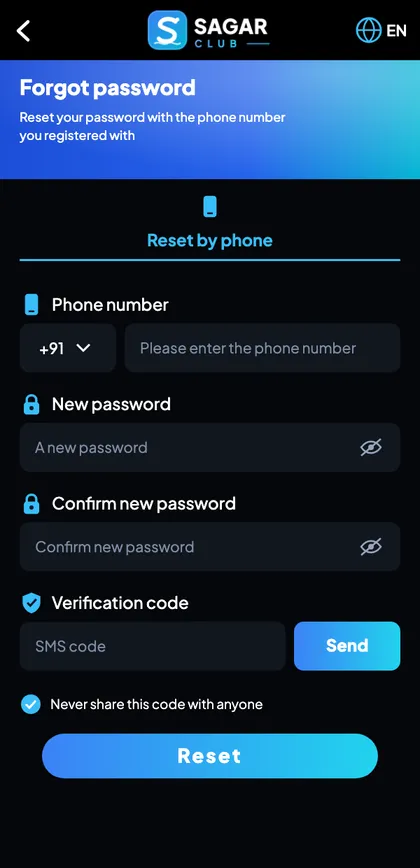
- On the login screen, tap Forgot password.
- Keep +91 and enter your registered 10-digit number.
- Type a new password.
- Type it again in Confirm new password.
- Tap Send to get the SMS code.
- Type the 6-digit code.
- Tap Reset.
- Log in with your new password.
The order on screen may vary slightly between versions – some ask for the code before the new password – but the parts are always the same: number, code, new password.
Choosing a new password
Don’t just add a 1 to the old one. If the old password was forgotten, it probably wasn’t memorable; if it was guessed, a small change won’t help. Use a passphrase instead:
| Step | Example (don’t copy) |
|---|---|
| Three unrelated words | kettle-river-moon |
| Add a number | kettle-river-moon-38 |
| Optionally a symbol | kettle-river-moon-38! |
- At least 8 characters – 12+ is better.
- Not your name, number, birthday or ‘sagar’.
- Not used for email, UPI or social media.
- Saved in your phone’s password manager.
When the SMS code doesn’t arrive
Reset codes go only to the registered number. If nothing arrives within the timer:
- Check the number on screen – one wrong digit and the code goes elsewhere.
- Look in your Messages app’s spam or blocked folder.
- Make sure DND isn’t blocking service messages.
- On a dual-SIM phone, check SMS is set to the right SIM.
- Wait for the timer, then tap Resend once.
- Restart the phone if signal is weak.
Full checklist with phone-brand settings: Sagar Club OTP not received.
Error messages during reset
| Message | Cause | Fix |
|---|---|---|
| Number not registered | You registered with a different SIM | Try your other numbers |
| Verification code incorrect | Typo or an older code | Use only the newest code |
| Code expired | Took too long | Request a fresh code |
| Passwords do not match | Typo or hidden space | Retype both by hand |
| Too many requests | Several codes requested | Wait about 30 minutes |
If you no longer have the registered number
A lost, stolen or deactivated SIM makes self-service reset impossible, because the code can’t reach you. You have two options:
- Get the SIM back. Your operator can issue a replacement SIM with the same number – usually the fastest route.
- Contact support. Use customer support with your UID, nickname and old number. They’ll verify you and help move the account – see new phone number.
If you bound an email, try email login first – you might be able to get in and change the number yourself.
After resetting
- Log in on every device you use – old sessions have ended.
- Update the password in your password manager.
- Check login security in your profile for unfamiliar devices.
- Bind an email if you haven’t, so this is easier next time.
If you reset because you suspect someone else got in
Resetting ends every other session immediately, so you’ve already done the most important thing. Next, think about how they got in – a shared OTP, a password typed on a forwarded link, a reused password from another site – and close that door. Then read account security and tell support what happened.
Why support can’t tell you your password
Passwords are stored in a scrambled form that even the app’s own staff can’t read. That’s deliberate: if anyone could look up your password, so could someone who tricked them. Support can help you reset it, but they’ll never tell you what it was – and anyone who offers to is lying.
Avoid needing this page again
- Use a password manager.
- Bind an email as a backup login.
- Don’t change passwords on impulse – change them deliberately and save the new one.
- Reset after two failed login tries instead of guessing.
A reset, walked through slowly
You tried your password twice, and it didn’t work. Instead of guessing a third time, you tap Forgot password. You type your 10-digit number and check it. You think of a new passphrase – three unrelated words and a number – and type it into both boxes, checking with the eye icon. You tap Send; ten seconds later, an SMS arrives and your phone offers to paste the code. You tap Reset, see a confirmation, and log in with the new password. Before doing anything else, you open your password manager and update the saved entry.
Why you shouldn’t keep guessing
Each wrong password counts towards a temporary lock that blocks attempts for 15–30 minutes – and further attempts during the lock can extend it. A reset takes two minutes; a lock can take half an hour. After two careful tries, resetting is always faster.
Reset on someone else’s phone?
You can request the reset from any device – the SMS code still goes to your SIM. If you use a friend’s phone to type the new password, use a private browser tab, don’t let it save the password, and log out at the end. Then log in on your own phone and, if you’re unsure who saw you type, change it once more.
If you suspect your SIM has been swapped
If your phone suddenly shows ‘No service’ and you didn’t do anything, and then you can’t reset your password because codes don’t arrive, contact your mobile operator immediately. SIM-swap fraud – where someone convinces an operator to move your number to their SIM – is rare but serious. Once your operator restores your SIM, reset your Sagar Club password and contact support.
Reset vs change vs support
| Situation | Use |
|---|---|
| I know my password but want a new one | Change password |
| I don’t know my password, I have my SIM | Forgot password (this page) |
| I don’t know my password and lost my SIM | Replacement SIM or support |
| Someone else changed my password | Forgot password now, then support |
Make the next reset unnecessary
Most people who reset once end up resetting again within months. Break the cycle: let your phone’s password manager generate or save the new password, and turn on its sync so it’s available on any new phone you get.
Open Sagar Club the right way
Use the official app or website – one Sagar Club account works for login on every device.
Frequently asked questions
How long does a Sagar Club password reset take?
About two minutes.
Can support tell me my password?
No – it’s never visible to anyone.
Can I reset using email?
The standard reset uses SMS to your registered number.
How many codes can I request?
A few; then wait about 30 minutes.
Will resetting log me out everywhere?
Yes – all other sessions end.
I lost my SIM. What now?
Get a replacement SIM from your operator or contact support.
Do I need my old password to reset?
No – only your registered number and the SMS code.
Can I reset from a laptop?
Yes; the code goes to your phone.